Tron Token Generator
create your own TRON token in seconds
Launch a fully-featured TRC-20 token on the TRON blockchain - no coding, no smart-contract knowledge. You get the entire supply and complete ownership, for one flat fee.
- 249 TRX
- Flat fee, all-in
- ~2 min
- From start to live
- 100%
- Yours - supply & ownership
Built for the TRON ecosystem
Everything your token needs, built in
Professional-grade TRC-20 features without touching a line of Solidity.
Instant deployment
Your contract is deployed to TRON mainnet in seconds and confirmed on-chain - no waiting around.
Full ownership
The complete token supply and contract ownership are transferred to your wallet. We keep nothing.
Mintable & burnable
Optionally allow new tokens to be minted, or let holders burn supply - your choice, set at creation.
Pausable transfers
Add an emergency pause switch to freeze transfers if you ever need to - a pro safety feature.
Renounce ownership
Make your contract immutable and trustless with one click, a powerful signal to your community.
Audited standard
Built on the battle-tested TRC-20 standard used by USDT and thousands of TRON tokens.
What is a Tron token generator?
A Tron token generator is a tool that writes, compiles and deploys a TRC-20 smart contract to the TRON blockchain on your behalf. Instead of learning Solidity, setting up a compiler and funding a deployment script, you fill in a form - name, symbol, total supply, decimals - and the generator produces a standards-compliant contract and broadcasts it to TRON mainnet from your wallet.
The output is not a special or proprietary asset. It is an ordinary TRC-20 token, identical in every technical respect to one written by hand: the same interface every TRON wallet, block explorer and DEX already understands. That is the whole point - a generator saves you the engineering, not the standard.
What separates generators from one another is what happens to ownership. A well-built one transfers the entire supply and the contract's owner role to your wallet in the deployment transaction, keeps no admin key, and embeds no privileged address in the bytecode. A badly built one keeps a back door. Because the contract is public on Tronscan the moment it is mined, this is something you can verify yourself rather than take on trust - and you should, whichever tool you use.
What you skip
Solidity, the TVM compiler toolchain, deployment scripts and contract verification.
What you keep
The full supply, the owner role, and the right to renounce ownership entirely.
What stays public
The contract source, the deployment transaction and every holder - all on Tronscan.
New to all of this? Start with how to create a TRON token, or check what it actually costs before you commit.
Live in three simple steps
No deployment scripts, no command line, no Solidity.
Configure your token
Choose a name, symbol, total supply and decimals. Toggle features like mintable, burnable or pausable.
Connect & pay
Connect TronLink and pay the one-time 249 TRX fee straight from your wallet. No account needed.
Receive your token
Your TRC-20 contract goes live on TRON and the full supply plus ownership lands in your wallet.
See it in action
Real screens from a real deployment - not mock-ups.
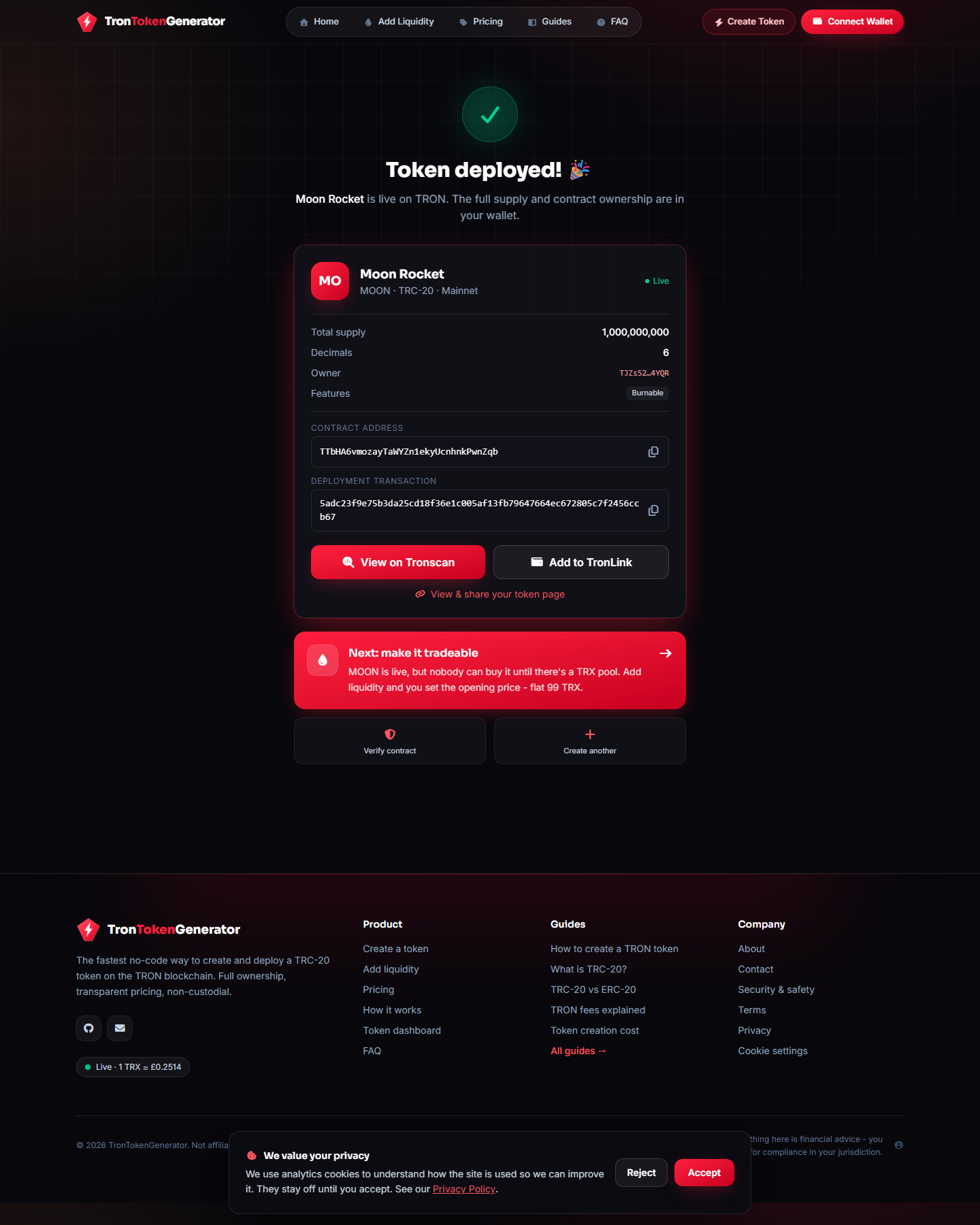
The moment a token goes live
Contract address, deployment transaction and owner wallet, straight after deployment. From here you can view it on Tronscan or add it to TronLink in one click.
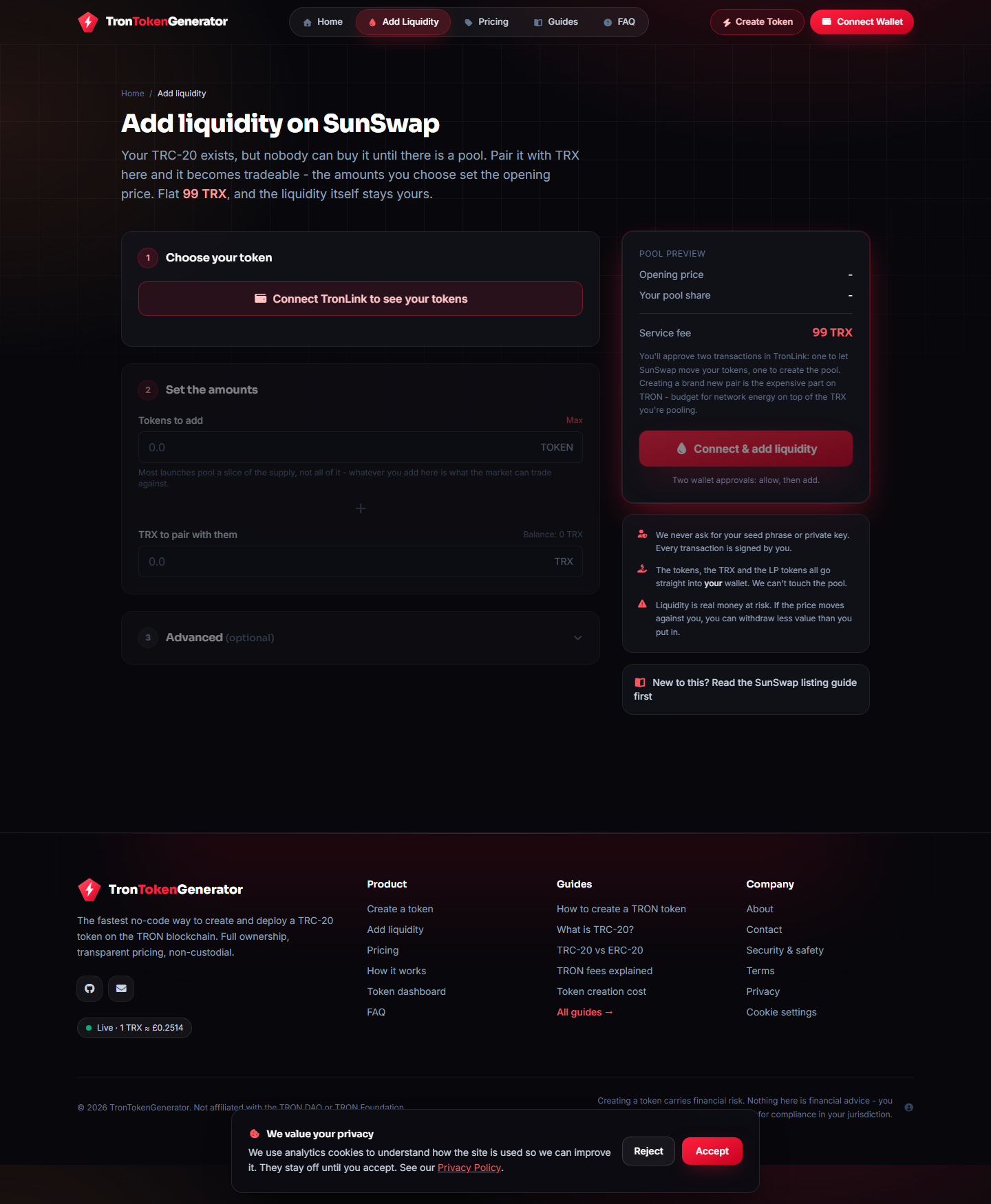
Making it tradeable
A token nobody can buy is just a database row. Pair it with TRX to open a SunSwap pool - you set the opening price, and the LP tokens stay in your wallet.
The transparent Tron token generator
One honest price. Everything included. No surprises.
- Flat 249 TRX - everything included
- Full supply + ownership to your wallet
- Mintable, burnable, pausable & renounce
- Live in ~2 minutes, no code
- Verified contract on Tronscan
- Write & test Solidity / TVM contracts
- Risk of bugs, lost ownership or honeypots
- Compile, deploy & verify yourself
- Hours of setup and debugging
- Manage energy & bandwidth manually
Recently created
View all →
Who runs this
Token generators are an easy place to hide. Here is everything you can check about us before you spend a single TRX.
The TronTokenGenerator team
Independent TRON tooling developers
We build and run TronTokenGenerator: no-code TRC-20 deployment from your own wallet, and the source of every token contract verified on Tronscan. These guides come from deploying tokens on TRON ourselves and from the questions users send us.
Every token contract we deploy has its source verified on Tronscan, so you can read exactly what it does before you buy or build on it. If something here does not match what the contract does on-chain, that is a bug worth telling us about - get in touch.
Verifiable facts
- Flat 249 TRX (about $83)
- One on-chain payment. No subscription, no per-feature upsell.
- Non-custodial
- We never hold your funds or your tokens, and never ask for a seed phrase.
- Verified on Tronscan
- Every token contract we deploy has its source published and readable on Tronscan.
Creating a token carries financial risk and nothing here is financial advice. You are responsible for compliance in your own jurisdiction.
Why create your token on TRON?
TRON is one of the busiest blockchains in the world, settling billions of dollars in stablecoin transfers every day. It is the home of the most widely-used USDT, thanks to fast, low-cost transactions. That makes it an ideal network to launch a TRC-20 token - whether you are building a community token, a utility token or a memecoin.
Ultra-low fees
TRON's energy and bandwidth model makes transfers cost a fraction of a cent - far cheaper than Ethereum gas.
Fast confirmation
Blocks confirm in around three seconds, so your token transfers feel instant.
Stablecoin powerhouse
TRON carries the largest share of circulating USDT, with deep liquidity and a huge retail audience.
Massive reach
Millions of active wallets and full support across every major TRON wallet and exchange.
TRON vs Ethereum vs BNB Chain for token creation
| TRON (TRC-20) | Ethereum (ERC-20) | BNB Chain (BEP-20) | |
|---|---|---|---|
| Typical transfer fee | Cents (often free with staked energy) | Dollars, sometimes much more | A few cents |
| Block time | ~3 seconds | ~12 seconds | ~3 seconds |
| Default decimals | 6 (like USDT) | 18 | 18 |
| Stablecoin liquidity | Very high | Very high | High |
| Best for | Low-cost, high-volume tokens | DeFi depth | EVM ecosystem |
For a deeper look, read TRC-20 vs ERC-20 and TRC-20 vs BEP-20.
Everything you need to launch, in one flat fee
Unlike token creators that charge per feature, our flat 249 TRX covers the whole job - contract deployment, network energy, every optional feature and the transfer of full supply and ownership to your wallet. No subscriptions, no surprise add-ons, and a price that undercuts the common 299 TRX competitors.
See exactly what's included- TRC-20 contract deployment
- Full supply to your wallet
- Contract ownership transfer
- Mintable, burnable, pausable
- One-click ownership renounce
- Network energy covered
- Verified on Tronscan
- Token metadata for wallets
Frequently asked questions
Everything you need to know before you launch.
Most tokens are live on the TRON blockchain in seconds. You fill in your token details, connect TronLink, pay the one-time fee, and the TRC-20 contract is deployed and verified automatically.
No. TronTokenGenerator is fully no-code. You only choose your token name, symbol, supply and a few options - we handle the smart-contract deployment for you.
Yes, completely. The entire token supply and full contract ownership are sent to your connected wallet at deployment. We never keep the supply or retain control - and you can renounce ownership for full immutability if you choose.
One flat fee of 249 TRX (about £63) covers everything: contract deployment, network energy, all token features and full ownership transfer. There are no subscriptions or hidden charges.
TRC-20 is the technical standard for fungible tokens on the TRON blockchain - the TRON equivalent of Ethereum’s ERC-20. It powers the majority of USDT in circulation and is supported by all major TRON wallets and exchanges.
TronLink is recommended (browser extension or mobile app). Any wallet that supports TRC-20 and can sign TRON transactions will work for receiving your token.
Never. We only ask you to connect your wallet and approve a single payment, which you confirm yourself in TronLink. We never request your seed phrase or private key, and the service is non-custodial - we never hold your funds or tokens. Anyone asking for your seed phrase or private key is a scammer.
At a flat 249 TRX, TronTokenGenerator is one of the most affordable ways to create a TRC-20 token - cheaper than many competitors that charge 299 TRX or more, with no per-feature upsells. Every feature (mintable, burnable, pausable, renounce) is included at no extra cost.
Yes. When you create your token you can enable any combination of mintable (create more later), burnable (let supply be destroyed) and pausable (an emergency transfer freeze). They are optional and all included in the flat fee.
Yes. Your token is a standard TRC-20, so it is compatible with TRON wallets, block explorers and DEXs. You can add a liquidity pool on SunSwap to make it tradable, and it can be listed on exchanges that support TRC-20 tokens.
Core parameters - name, symbol, supply and decimals - are fixed on-chain at deployment and cannot be changed. If you enabled mintable or pausable, you (as the owner) can still mint or pause. Choose your settings carefully before deploying, or simply create a new token.
Yes - you pay the one-time 249 TRX fee from your own wallet, plus a small amount of TRX for network energy. You do not need any other tokens. The fee covers the deployment and all features.
TRC-10 is a simpler native token built into the TRON protocol; TRC-20 is a full smart-contract token (the TRON equivalent of ERC-20) with features like minting, burning and DEX trading. We deploy TRC-20 tokens because they are what wallets, exchanges and DeFi expect.
Still curious? Read the full FAQ or contact us.
Ready to launch your TRON token?
Configure, connect, and deploy in seconds - for one flat 249 TRX, with the supply and ownership going straight to your wallet.